Please Do not Use 'Internet Explorer' to Browse This Site . 'Use Firefox, Opera Or Any Other Browser' to Get an Excellent View And Performance Of This Site. My Site Do not Support Internet Explorer. Though U Can Continue Browsing With Internet Explorer But May be Will Not Get The Best.

29 May, 2009

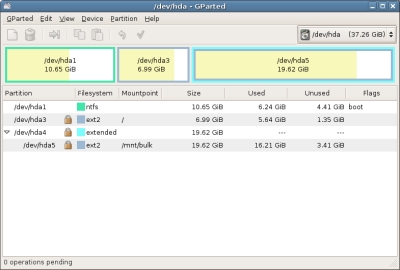
GParted Linux PartitionMagic


We know about this. You can create your partition without lose any data. By using this software you can resize, delete, copy, paste etc can do. You can use this software by Live CD or USB.

GParted file system working list:
ext2
ext3
fat16
fat32
hfs
hfs+
jfs
linux-swap
ntfs
reiserfs
reiser4
ufs
xfs

Puppy Linux


This linux OS you can use it Pentium 1 PC. For run this you need minimum 64MB memory. it is very nice view. It is very small operating system you can use it by Live CD and pendrive. For Live CD you must be download .ISO file. It download is very easy. Puppy Linux installation take time 4/5 minutes. It have word processor, speedshit, internet browser, games, image editor, Multimedia and many other things. For More details visite and download here,

Slax Operating System


You can use/run it from your pen drive or boot able CD. And use any computer it no need to install.

1. At first Download Slax two kind of format file ".iso and .tar" from this link http://www.slax.org/

2. .iso for CD and .tar for pen drive.

3. Unzip .tar file.

4. Here you will see two file 'boot and slax ' keep two file on your pendrive.

5. Now GO 'boot' folder and double click 'bootinst.bat' on this file and give Enter by rule. Now your pen drive is Bootable

6.Now GO your PC BIOS setup and select Boot First from Pendrive.

7. Now add pen drive your PC USB port and restat your PC.

Then slax OS will be run automatically.

Ubuntu 8.10 install is very Easy.


Linux free, virus free, safety, speedy OS we know that. Our country Linux user is very poor because we are using Pirated windows. May be this facility we can not carry hole life and it should not be also. For that another country Linux is there only OS. But we can use it with windows by dual Boot. Normal user think that Linux install is very risky work. For that he can lose his all of data some thing like that. But for them, I am saying if you have a any small software install experience then you can install Ubuntu 8.10 on your PC. This is real. At present this version is very popular for Desktop user. And its install is very easy. So lets try,

1. Insert Ubuntu CD when your is running with windows.

2. You can see Automatically Ubuntu CD Menu.
3.Click 'Install inside Window' button.


4. Ubuntu Setup screen will come. Then press 'Install Inside windows' Button.
Installation Drive = C:
Installation Size = 4 (Here you quarry that how much place free of your "C:" drive. If "C:" drive space less then 4GB then select another drive which have free space grater then 4GB and select that) follow below picture,
Desktop Environment = Ubuntu
Language = English
Username = Your user name(Exm: sojib)
Password = Your choose able password (Exm: abc123)


Then press install. And wait until setup is not completed.

5. After install completed then Restart will be required. Then press 'Finish'.

6.When your PC again start then two choose will be appear. Which one you want to select
i) Windows
ii)Ubuntu 8.10

Then select you choose and enjoy Dual operating system in your PC.
For CD you can contact with me by email sktsojib@yahoo.com

Super OS (Super Ubuntu) 9.04


At present for Linux very popular Distribution is Ubuntu Linux. Now it is latest version is Super OS 9.04. Super OS is Ubuntu's Linux Modified version. What is main Difference that listed below,

1. Hi level Multimedia supported : Building VLC player, DVD codec, MP3 codec and many other Multimedia.

2.For Internet it have a lot of Software: aMSN, Opera, Firefox, Flash, Moonlight and Google's Software building.

3. Other Software: Java, Ubuntu Tweak, StartUp-Manager etc Building.

4. Ubuntu Repojitory Super OS have a personal Repojitory.

5. It have facility for create Live USB Bootable drive.

6. KDE and QT Library Building.

You can download from here Live CD/ DVD.

28 May, 2009

Use EDGE/GPRS in Linux by Mobile.

It is very difficult to Use EDGE/GPRS in Linux by using Mobile. Buy if you follow below rule then you can use it easily.

1.From Taskbar click Application then click “kppp ” from internet.

2. Then press ”setup” button.

3. Now create “connection name” as your wish and give User and Password.

4.Now click “add” button and type *99***1#.

5. Then select "PAP" from Authentication Option.

6. Now click “IP” Tab and give tik “dynamic IP address”.

7. Then click “gateway” Tab and tik “Default gateway” Tab.

8. Then press “OK”.

9. Now Go “modem” terminal and click “setup” button.

10. Create any name form Modem.

11. "Select modem" here select '/dev/ttyACM0' then press ok.

12. No need "login name and password".

13. Now we create 'KPPP dialer'.

14. Click “connect” button.

15. Now dial will be start and show configure connection Status. But now you can not Browse. Now we should “nameserver” configure. For that open 'filesystem/etc/resolv.conf' and write below two line(This two 'Nameserver' is for "Grameen Phone").
nameserver : 202.56.4.120
nameserver : 202.56.4.121

16. Then save and out.

17. Now Browse Internet.